Live bus information
Most buses in York are now fitted with real-time tracking equipment, providing live departure time information via on-street displays and internet-connected devices.
Buses operated by Arriva, ConnexionsBuses, East Yorkshire, First and Transdev are able to send live location data from their ticket machines to the real-time system.
If your service number is showing a corresponding departure time in minutes, for example "3 mins", then that bus is being tracked in real-time. Departures showing clock times such as "11:42" are not being tracked.
The core real-time information system is provided under contract to a consortium of local authorities consisting of West Yorkshire Combined Authority, South Yorkshire Mayoral Combined Authority and City of York Council.
York's on-street information screens are provided by City of York Council. Report any faulty screens to us on email: buses@york.gov.uk.
It is the responsibility of local bus operators to submit accurate timetable and service cancellation data into the system and to ensure that the real-time equipment fitted to their vehicles is functioning correctly.
Real-time information screens
Electronic screens are fitted at many key bus stops, including the majority of stops in York city centre.
Mobile apps
A range of free apps are available from bus operators and other providers.
Try searching for First Bus, Transdev Go, East Yorkshire Buses, Arriva UK Bus or MyTrip Passenger on the App Store or Google Play.
Online information
The Metro Your Next Bus webpage can display real time departure information for connected stops and services across the Yorkshire region - just enter an 8-digit stop code, route number or postcode.
Using the real-time links shown on this website, or any QR codes and NFC tags shown at stops, will take you to a dedicated webpage showing live information for that stop, along with the ability to listen to an audio description of the departure information.
QR codes and NFC tags
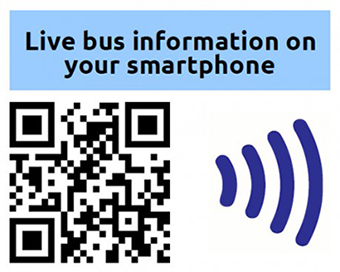
Our on-street bus timetables include a Quick Response (QR) code and a Near Field Communication (NFC) tag, which can both be used to access free real-time information on your smartphone.
When you refer to one of our timetables, look out for the section at the bottom of the left-hand timetable panel, similar to the image shown here.
Using the QR code
If you have a smartphone with a camera, first you'll need to download an app to read QR codes. Several free apps are available - search your app store for "QR code reader" or "barcode scanner". Newer phones can usually read QR codes directly using the built-in camera app.
From then on, all you need to do is aim your phone's camera at the black and white square pattern. Your phone should then find a web-link which will open up a real-time information display showing your next bus departures for the stop you're at.
Using the NFC tag
If your phone includes NFC technology, it's even easier to get live bus information. Simply make sure the NFC feature is enabled on your phone, then place it over the blue NFC icon. Your phone should detect the presence of the NFC tag, some phones make an audible 'beep', and then offer to open a web link to the real-time information.
NFC technology is included in many current mobile devices. If you're not sure whether your phone is NFC-capable, check your user manual or the manufacturer's website. If you're planning to upgrade to an NFC phone, the NFCWorld website has a comprehensive list of current and upcoming NFC-enabled phones.
Save your favourites
Once you've used a QR code or NFC tag, bookmark the stop in your web browser. Next time you travel you can view live information for your favourite stops before you set off.

Find out where to board your bus in York city centre. Travel for as little as £4.42 per day when you buy a multi-day smart ticket, valid on all buses in York.
All York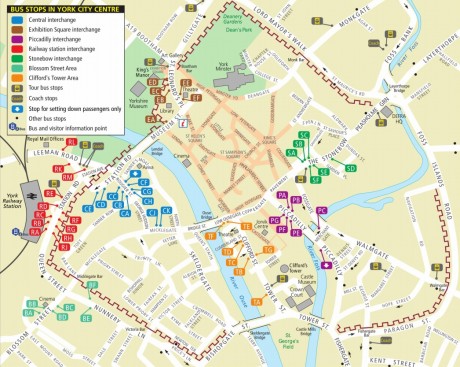
Find out where to board your bus in York city centre.
Local bus connections